What is WinOLS?
The ECU editor explained, properly.
WinOLS, by EVC Electronic, is the map-editing software most professional remapping businesses in Europe are built on. This guide explains how it actually works — projects, maps, checksums, DAMOS — and where it stops and the rest of your file service begins.




WinOLS in one paragraph
WinOLS opens a binary file read from a vehicle's engine control unit, helps you find the calibration maps hidden inside it, lets you edit those maps as tables and 3D surfaces, corrects the checksums, and writes a modified file back out. It is an editor — it does not read from or flash to the car itself. That job belongs to a flashing tool such as an Alientech KESS3, Magic Motorsport Flex, AutoTuner or bFlash. WinOLS is what a professional uses on the file in between reading it and writing it back.
Projects, Originals and Versions — how WinOLS organises work
Everything in WinOLS lives inside a project. A project holds the Original — the untouched file exactly as it came out of the ECU — plus any number of versions, each one a set of modifications layered on that original. Alongside the binary data, the project stores the vehicle's identity: producer, chassis, engine, ECU software version, and the file's fingerprints (MD5 and SHA checksums of the EPROM and CPU areas).
This model matters more than it first appears. The Original is sacred — WinOLS is designed so that edits become versions rather than overwriting the source, which is precisely what lets a professional shop return a customer's untouched original two years later. When a shop can't do that, it usually isn't a WinOLS problem: it's a filing problem, and it lives in how jobs and files are tracked outside the editor.
Why the project database is a tuner's real asset
Because each project records the ECU's identity and fingerprints, a mature WinOLS installation becomes a searchable library: given a new read, you can find every similar file you've ever worked on by producer, model or software version. Twenty years of that is a genuine competitive moat — and it's why experienced tuners are obsessive about keeping vehicle data accurate on every single job. If the reg, VIN and ECU details arrive with the file instead of being retyped from a WhatsApp message, the library stays clean. That's one of the quiet reasons file portals exist: the vehicle details auto-fill from the reg plate at submission, so the data that reaches WinOLS is right first time.
Finding maps: from hex soup to labelled tables
A raw ECU read is megabytes of unlabelled numbers. Somewhere inside are the two- and three-dimensional lookup tables that control injection quantity, boost pressure, torque limits, rail pressure and dozens of other parameters — but nothing in the file says which bytes are which.
WinOLS attacks this three ways:
- Automatic map search. WinOLS scans the binary in the background for the numeric patterns calibration tables tend to form — smooth gradients, plausible axis structures — and flags candidate maps for review. It finds shapes, not meanings: a human still decides what each candidate is.
- Definition files (DAMOS / A2L). The gold standard. A DAMOS or A2L file is the manufacturer's own description of the binary — names, addresses, axes and scaling for every map. With one loaded, an anonymous 16×16 table becomes "KFMIRL — torque to air-mass conversion". Guesswork becomes engineering.
- Map packs and past projects. Definitions you've built or bought can be imported onto new projects of the same ECU family, so knowledge from one file transfers to the next. WinOLS can also carry changes across between similar files with absolute, relative or percentage transfer modes — powerful, but the manual itself cautions that fully automatic transfers can't be guaranteed complete or correct, which is why professionals review every map a machine has touched.
Checksums: the part that bites amateurs
Change a single byte in an ECU file and its checksums no longer match. Depending on the ECU, the result is anything from a stored fault code to a car that refuses to start. WinOLS handles this with a library of checksum modules: it searches the project to identify which checksum families apply, and — as a deliberately separate step — applies the corrections when you're ready.
Two professional habits follow from how this actually works. First, search and apply are separate on purpose: finding a checksum is not the same as having corrected it, and a disciplined workflow checks the checksum status before a file ever goes back to a customer. Second, some flashing tools apply certain corrections themselves at write time — so a shop needs a policy on who corrects what, rather than blindly double-applying. Automatic checksum correction across a huge range of ECUs is, more than any other single feature, why professionals pay for WinOLS rather than editing in a free hex editor.
Where WinOLS sits in a real file-service workflow
Here is the whole job, end to end. WinOLS covers exactly two of the six steps.
Steps 1, 2, 5 and 6 are where most file services actually lose time and money — chasing vehicle details, digging through email threads, invoicing manually, losing originals. That's the gap portal software exists to close.
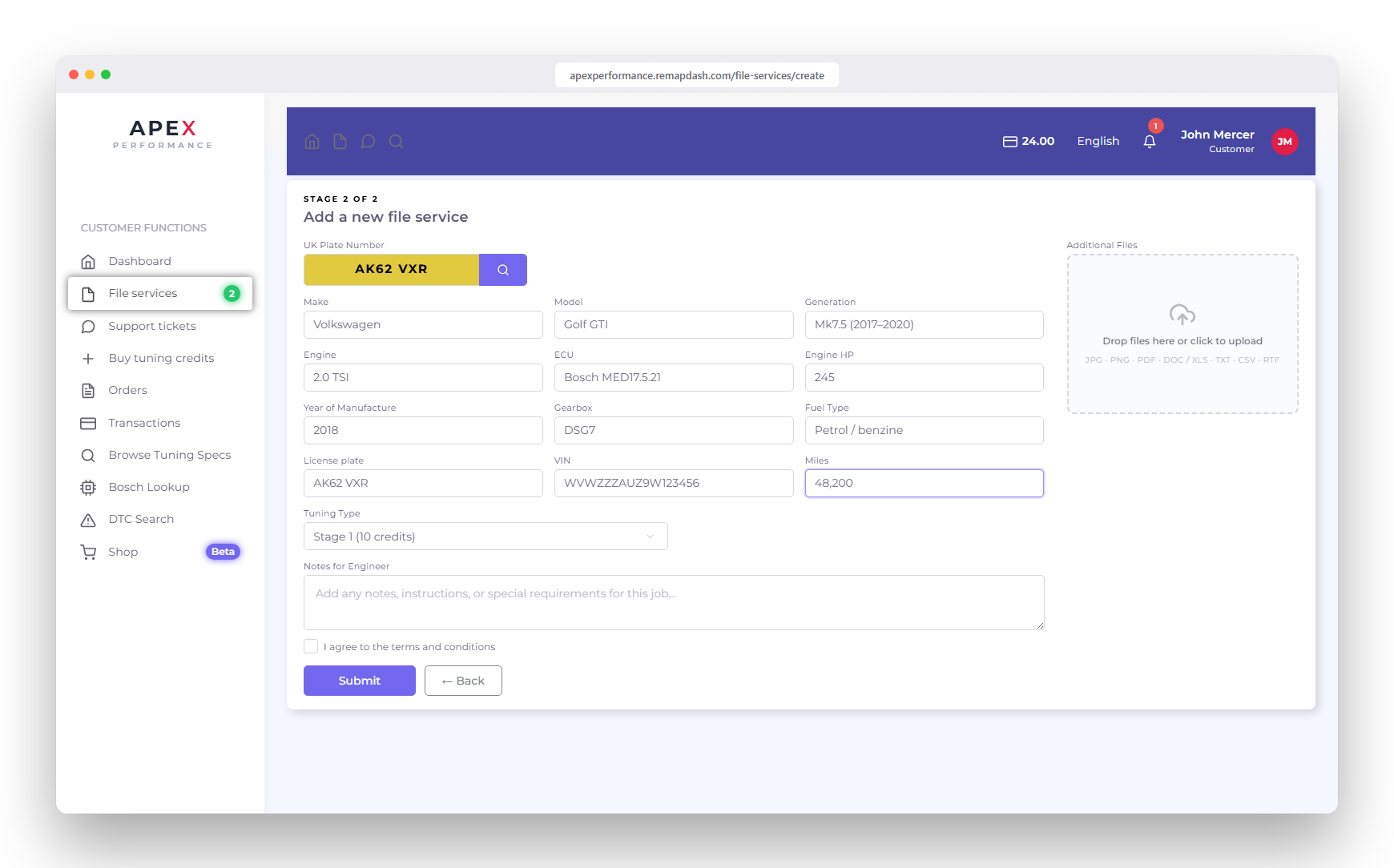
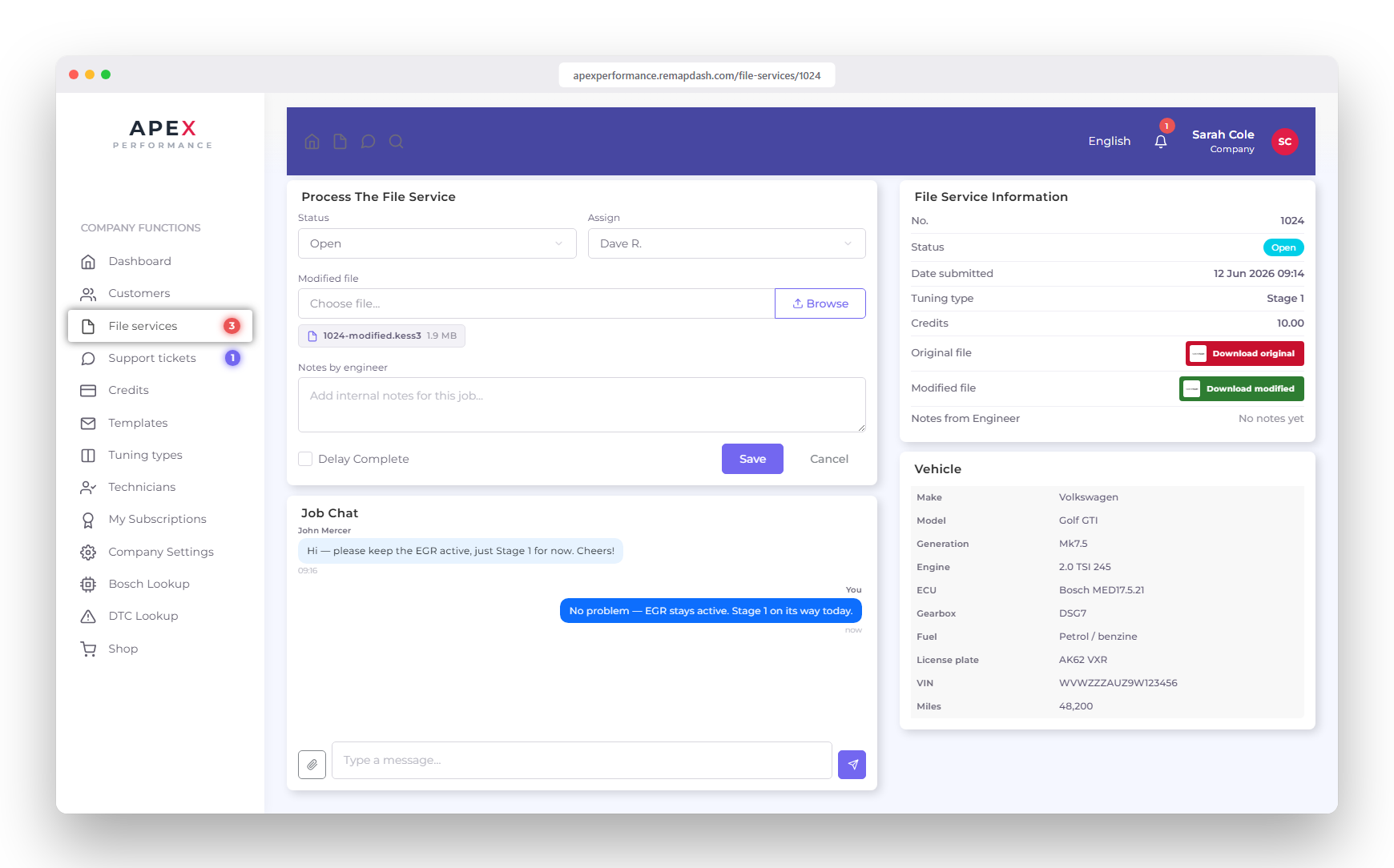
RemapDash is that portal layer: it sits either side of the editor and never touches your files — the tuning stays entirely yours. If you're weighing up the options, the five-year cost comparison shows what's included against other portal platforms, and the tuning API covers embedding vehicle data on a site you already run.
Licensing, pricing and the cracked-copy question
WinOLS is commercial software sold by EVC in tiers, with the tier determining which ECU types and features are unlocked. There's no public list price; quotes come from EVC and authorised resellers, and the total depends on tier, activations and any map-pack or add-on subscriptions. Budget for it as capital tooling alongside your flashing hardware — and expect the supporting data (definitions, map packs) to be the larger ongoing cost over time. We use WinOLS in our own tuning work daily, which is why EVC credit management is built into the portal.
And the question everyone searches sooner or later: cracked copies. Running one in a commercial tuning business is a bad trade, and not mainly for legal reasons. No checksum updates for new ECUs, no support when a file misbehaves, and a modified binary of unknown origin running on the machine that holds every customer's data. If cost is the blocker, ask a reseller about a lower tier — a business that depends on its reputation shouldn't run on unlicensed calibration software.
Frequently asked questions
Is WinOLS free?
No. WinOLS is commercial software licensed by EVC Electronic and sold in tiers. There is no free full version — pricing is quoted by EVC and its resellers and varies by tier and activation count. A demo exists for evaluation, but commercial tuning work requires a licence.
Do I need WinOLS to remap cars?
Not strictly — some tuners work from pre-made files supplied by a file service, and other editors exist. But WinOLS is the de facto standard for custom ECU calibration work in Europe, and most professional file services are built around it.
What is the difference between WinOLS and a flashing tool?
A flashing tool such as an Alientech KESS3, Magic Motorsport Flex, AutoTuner or bFlash reads the file out of the ECU and writes the modified file back to it. WinOLS is what you use to edit the file in between. They are complementary — every professional setup has both.
What is a DAMOS file?
A DAMOS file is the manufacturer's definition of an ECU binary: the names, addresses, axes and scaling of every calibration map inside it. Loaded into WinOLS, it turns anonymous numeric tables into labelled, engineering-meaningful maps. A2L is a related definition format from the same measurement-and-calibration world.
Does WinOLS handle checksums?
Yes — WinOLS searches a project to identify the applicable checksum families and can then apply corrections, across a wide range of ECUs. Search and apply are deliberately separate steps, and some flashing tools also correct certain checksums at write time, so professional shops keep an explicit policy on who corrects what.
Does WinOLS manage customers, jobs or invoicing?
No. WinOLS is a file editor with a project database — it has no customer accounts, job queue, invoicing or file delivery. Those functions are handled by portal software such as RemapDash, which sits around the editor in the workflow — and now includes a free WinOLS LUA bot that automates repetitive editor tasks while the calibration decisions stay yours.
Can I run WinOLS on a Mac?
WinOLS is Windows software. Tuners on macOS typically run it in a Windows virtual machine or keep a dedicated Windows PC for tuning work.
Go deeper
- the WinOLS automation bot — DTCs and solutions from your own library, included free with every portal.
- DAMOS & A2L files explained — where definitions come from and how to judge their quality.
- Getting started with WinOLS — a realistic learning path and the beginner mistakes that cause damage.
- What WinOLS actually costs — how the tiered licensing works and how to budget for it.
- WinOLS alternatives — editors, automation platforms and file services, honestly compared.
- EVC credits & resellers — how the ecosystem around the editor works.
WinOLS and DAMOS are products and trademarks of EVC electronic GmbH. RemapDash is an independent portal-software provider, written by professional tuners who use WinOLS daily; this guide is educational and is not affiliated with or endorsed by EVC. Always verify current licensing details with EVC or an authorised reseller.
You handle the maps. We'll handle everything else.
RemapDash wraps your WinOLS workflow in a branded customer portal — reg-plate lookup, job queue, chat, invoicing, mobile app, Telegram and a free WinOLS LUA bot — for £74.50 /month for your first 6 months, then one flat £129 /month. No per-file charges, no VPS bills, no contract.